Monthly maintenance updates will occur on Thursday, November 20th, 5:00 - 10:00 p.m. This includes our monthly mandatory security patches for all services. Users may experience intermittent downtime.
Help Desk Thanksgiving Break Hours:
Wednesday, 11/26: 8:00 a.m. - 5:00 p.m.
Thursday, 11/27 - Saturday, 11/29: Closed
Sunday, 11/30: Regular Schedule
Chancellor Freeman's Cybersecurity Challenge
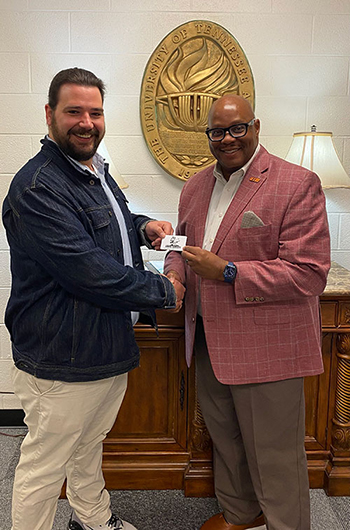
This October, ITS challenged faculty and staff to "Beat the Chancellor to the Finish Line" by completing their Security Awareness Training before October 10. The names of the faculty and staff who met the deadline were entered into a drawing. ITS congratulates Andrew Larkins from Academic Records who was the lucky winner and took home a Chick-fil-A gift card, presented by Chancellor Freeman.
ITS awarded the first four staff and faculty who completed the SANS training with prizes:
1st Place - Dr. Anthony Delmond, College of Business & Global Affairs, won a Dell Travel Mouse.
2nd Place (tie) - Rebekah Lewis and Steven Robertson, ITS, both won a Dell Travel Dock, Dell Pro Mouse, and a Keyboard.
3rd Place - Dr. Mary Radford, Department of Nursing, won a Dell Backpack.
ITS appreciates everyone's continued commitment to cybersecurity awareness and campus safety!
Stay Secure All Year with the "Core 4"
National Cybersecurity Awareness Month may be over, but protecting our digital lives at work and home is a year-round effort. You don't need to be a tech expert, just focus on these "Core 4" habits:
1. Use Strong Passwords & a Password Manager
Use a unique, strong password (or passphrase) for every single account. This prevents one breach from compromising all your accounts. A password manager is the easiest way to create and store these unique credentials securely.
2. Turn On Multifactor Authentication (MFA)
This is one of the most effective ways to secure your accounts. MFA (or 2FA) requires a second piece of proof (like a code from your phone or your fingerprint) in addition to your password. Even if a criminal steals your password, they still can't log in. Enable MFA on all your accounts, where available.
3. Recognize and Report Scams
Be skeptical of phishing emails, suspicious texts, and urgent pop-ups. These tricks try to get you to click malicious links or share personal data. Look for red flags like:
Urgent requests for money or sensitive data.
Spelling and grammar mistakes. (Be cautious, as scammers are using AI to write more polished, error-free messages.)
Sender addresses that look almost right, but not quite. When in doubt, don't click. Report suspicious emails using the Report Message feature in Outlook or by forwarding them to abuse@utm.edu.
4. Update Your Software
Those update notifications are critical, not suggestions. Updates contain vital security patches that fix vulnerabilities hackers can exploit to access your devices and data. Keep your operating system, browsers, and apps updated. The easiest method is to turn on automatic updates on your devices.
Please feel free to contact the UTM Help Desk at 731-881-7900 or helpdesk@utm.edu if you have any questions about the "Core 4" or to report anything suspicious.
AI Responses vs. Authentic Assessments
AI prevents challenges to many online assignments, but testing can be especially vulnerable. Check out these tips for creating better online test questions.
Explain your expectation of the use of AI in online tests and assignments (e.g. integrity of their work, when AI can/cannot be used, etc.).
Create authentic assignments or test questions that require problem solving, creative thought, or critical thinking. For example, you might create an online test that relies primarily on objective questions, but that also includes one question that presents a case that requires students to answer how they would respond and to justify their responses.
Require that students record a video of themselves describing a possible solution to a problem or case.
Deploy Proctorio to minimize students' ability to use their device to access AI while taking a test.
ITC November Training Topics
Log in to Runway for more information about the sessions, locations, and time. Contact the ITC if you have questions or need assistance.
Akindi Test Generator for Building Question Banks Quickly
Th, 11/6, 2:00 - 3:00 p.m.
W, 11/12, 2:00 - 3:00 p.m.
Canvas Classic vs. New Quizzes
T, 11/11, 2:00 - 3:00 p.m.
W, 11/19, 3:00 - 4:00 p.m.
Proctorio Secure Exam Proctor: Tips for Using the Tool